1. 打開Outlook,按"檔案"
Open Outlook, click File
2. 點擊"帳戶設定" -> "帳戶設定"
Click Account Settings -> Account Settings
3. 選擇你的電子郵件戶口,按"變更"
Select your email account, and click Change
4.
Outlook 2016
當您使用 IMAP 帳戶時,您無法變更寄件備份的儲存位置,不過您可以 關閉完全儲存已傳送的郵件
You can't change where sent items are stored, although you can turn off saving of sent messages entirely.
如果您透過 Outlook 使用 IMAP 帳戶,您可能會注意到已傳送郵件被儲存了兩次。 若要解決這個問題,您可以在 Outlook 中關閉寄件備份的儲存
If you are using an IMAP account with Outlook, you may notice that sent messages are being saved twice. To resolve this, you can turn off saving of sent items in Outlook.
不要選擇 "Don't save copies of sent items"。
Do not tick "Don't save copies of sent items".
Older version Outlook
按"其他設定" Click More settings

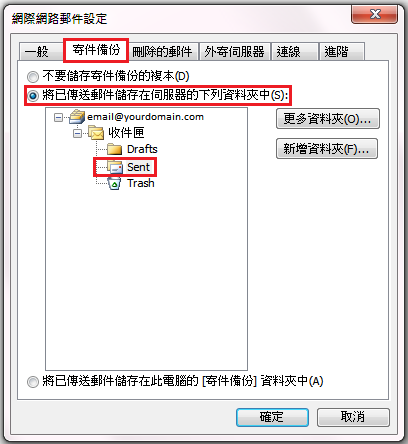
5. 選擇「寄件備份」, 並選擇伺服器上相對應的信箱。
Click Sent Item, and select the corresponding mailbox on the server.
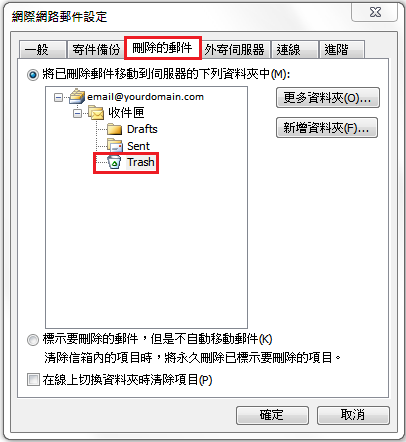
5. 另外可選擇「刪除的郵件」,並選擇伺服器上相對應的信箱。
Moreover, click Deleted Items, and select the corresponding mailbox on the server.